赛车模拟器人体工学 设定
本文最后更新于 2026-04-02,文章内容可能已经过时。
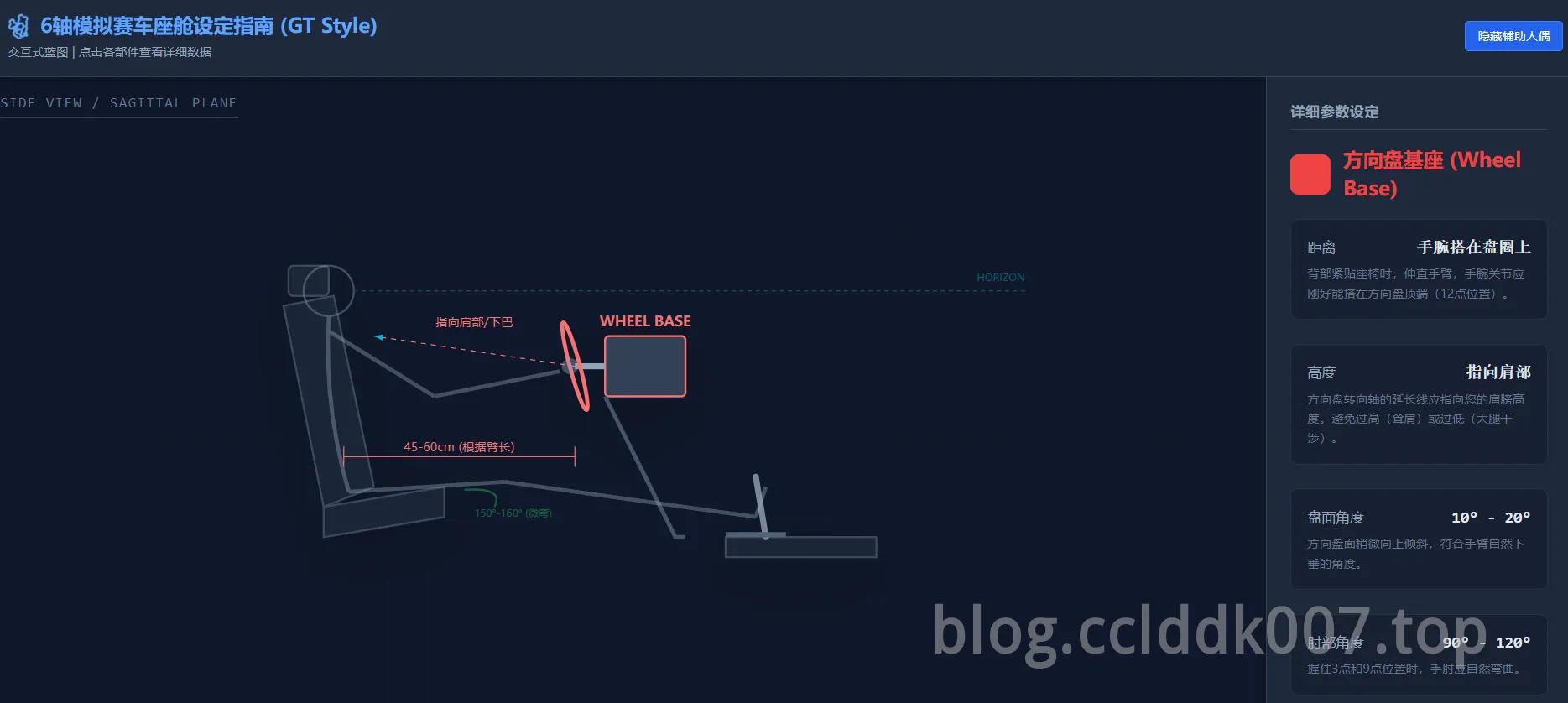
<!DOCTYPE html>
<html lang="zh-CN">
<head>
  <meta charset="UTF-8">
  <meta name="viewport" content="width=device-width, initial-scale=1.0">
  <title>6轴模拟赛车座舱设定指南</title>
  <!-- 引入 Tailwind CSS CDN -->
  <script src="https://cdn.tailwindcss.com"></script>
  <!-- 引入 React/ReactDOM CDN -->
  <script src="https://unpkg.com/react@18/umd/react.development.js"></script>
  <script src="https://unpkg.com/react-dom@18/umd/react-dom.development.js"></script>
  <!-- 引入 Babel CDN,用于在浏览器中实时编译 JSX -->
  <script src="https://unpkg.com/@babel/standalone/babel.min.js"></script>
  <!-- 引入 Lucide Icons (React Icons Library) -->
  <script type="module">
    // 在浏览器环境,我们需要确保 Lucide icons 也能被加载,这里使用一个辅助函数模拟导入
    // 由于 Babel 无法直接处理模块导入,我们简化使用纯 SVG 绘制,或依赖全局可用的组件
  </script>
  <style>
    /* 定义 Tailwind 动画 */
    @keyframes spin-slow {
      from { transform: rotate(0deg); }
      to { transform: rotate(360deg); }
    }
    .animate-spin-slow {
      animation: spin-slow 10s linear infinite;
    }
    /* 确保 body 占满整个视口 */
    html, body, #root {
      height: 100%;
      margin: 0;
      padding: 0;
      overflow: hidden;
    }
  </style>
</head>
<body>
  <div id="root"></div>

  <script type="text/babel">
    // 简化 Lucide Icons 的实现,使用简单的 SVG 代替,以便在 Babel/CDN 环境下运行
    const Icon = ({ children, size = 24, style, className }) => (
      <svg
        width={size}
        height={size}
        viewBox="0 0 24 24"
        fill="none"
        stroke="currentColor"
        strokeWidth="2"
        strokeLinecap="round"
        strokeLinejoin="round"
        style={style}
        className={className}
      >
        {children}
      </svg>
    );

    const Settings = (props) => (
      <Icon {...props}>
        <path d="M12.22 2h-.44a2 2 0 0 0-2 2v.18a2 2 0 0 1-1 1.73l-.43.25a2 2 0 0 0-.6 3.4L6 10a2 2 0 0 1-1 1.73v.54a2 2 0 0 1-1 1.73l-.43.25a2 2 0 0 0-.6 3.4L4 18a2 2 0 0 1 1 1.73v.18a2 2 0 0 0 2 2h.44a2 2 0 0 0 2-2v-.18a2 2 0 0 1 1-1.73l.43-.25a2 2 0 0 0 .6-3.4L18 14a2 2 0 0 1 1-1.73v-.54a2 2 0 0 1 1-1.73l.43-.25a2 2 0 0 0 .6-3.4L20 4a2 2 0 0 0-2-2h-.44a2 2 0 0 0-2 2v.18a2 2 0 0 1-1 1.73l-.43.25a2 2 0 0 0-.6 3.4L18 10a2 2 0 0 1-1 1.73v.54a2 2 0 0 1-1 1.73l-.43.25a2 2 0 0 0-.6 3.4L16 18a2 2 0 0 1-1 1.73v.18a2 2 0 0 0 2 2h.44a2 2 0 0 0 2-2v-.18a2 2 0 0 1 1-1.73l.43-.25a2 2 0 0 0 .6-3.4L18 14a2 2 0 0 1 1-1.73v-.54a2 2 0 0 1-1-1.73l-.43-.25a2 2 0 0 0-.6-3.4L16 4a2 2 0 0 0-2-2h-.44a2 2 0 0 0-2 2v.18a2 2 0 0 1-1-1.73l-.43-.25a2 2 0 0 0-.6-3.4L12.22 2z" />
        <circle cx="12" cy="12" r="3" />
      </Icon>
    );
    const Armchair = (props) => (
        <Icon {...props}>
            <path d="M11 9H9a2 2 0 0 0-2 2v4a2 2 0 0 0 2 2h2"></path>
            <path d="M13 17h2a2 2 0 0 0 2-2v-4a2 2 0 0 0-2-2h-2"></path>
            <path d="M6 15v-3"></path>
            <path d="M18 15v-3"></path>
            <path d="M2 21v-4a2 2 0 0 1 2-2h16a2 2 0 0 1 2 2v4"></path>
        </Icon>
    );
    const Disc = (props) => (
        <Icon {...props}>
            <circle cx="12" cy="12" r="10"></circle>
            <circle cx="12" cy="12" r="3"></circle>
        </Icon>
    );
    const ChevronsRight = (props) => (
        <Icon {...props}>
            <path d="M13 17l5-5-5-5"></path>
            <path d="M6 17l5-5-5-5"></path>
        </Icon>
    );
    const Info = (props) => (
        <Icon {...props}>
            <circle cx="12" cy="12" r="10"></circle>
            <path d="M12 16v-4"></path>
            <path d="M12 8h.01"></path>
        </Icon>
    );
    const MousePointer2 = (props) => (
        <Icon {...props}>
            <path d="m4 4 7.07 16.97 2.5-4.57 6.44 2.89L20 4Z" />
        </Icon>
    );


    const SimRigErgo = () => {
      const [activePart, setActivePart] = React.useState(null);
      const [showMannequin, setShowMannequin] = React.useState(true);

      // 模拟器参数数据
      const rigData = {
        seat: {
          title: "赛车桶椅 (Bucket Seat)",
          color: "#3b82f6",
          params: [
            { label: "靠背角度", value: "100° - 110°", desc: "相对于水平面。动感模拟器建议稍微后倾,以利用背部承受加速G力。" },
            { label: "底座倾角", value: "10° - 15°", desc: "座椅前端略微抬高,使大腿完全贴合椅面,避免急刹车时身体前滑。" },
            { label: "视线高度", value: "屏幕垂直中心", desc: "眼睛应处于显示器垂直高度的50%-60%处,平视前方路面。" }
          ]
        },
        wheel: {
          title: "方向盘基座 (Wheel Base)",
          color: "#ef4444",
          params: [
            { label: "距离", value: "手腕搭在盘圈上", desc: "背部紧贴座椅时,伸直手臂,手腕关节应刚好能搭在方向盘顶端(12点位置)。" },
            { label: "高度", value: "指向肩部", desc: "方向盘转向轴的延长线应指向您的肩膀高度。避免过高(耸肩)或过低(大腿干涉)。" },
            { label: "盘面角度", value: "10° - 20°", desc: "方向盘面稍微向上倾斜,符合手臂自然下垂的角度。" },
            { label: "肘部角度", value: "90° - 120°", desc: "握住3点和9点位置时,手肘应自然弯曲。" }
          ]
        },
        pedals: {
          title: "踏板 (Pedals)",
          color: "#22c55e",
          params: [
            { label: "距离", value: "膝盖微弯", desc: "将刹车/油门踩到底时,腿部不能完全伸直(锁死膝盖),应保留约150°-160°的角度。" },
            { label: "踏板面角度", value: "90° (相对小腿)", desc: "静态时,脚掌与踏板面接触角度应接近垂直,避免脚踝过度背屈。" },
            { label: "高度", value: "脚跟低于臀部", desc: "GT坐姿中,脚跟位置通常比臀部低10-20cm左右;F1坐姿则高于臀部。" }
          ]
        }
      };

      const currentInfo = activePart ? rigData[activePart] : null;

      return (
        <div className="flex flex-col h-full bg-slate-900 text-slate-100 font-sans selection:bg-blue-500 selection:text-white">
          {/* Header */}
          <header className="bg-slate-800 border-b border-slate-700 px-6 py-4 flex items-center justify-between shadow-md z-10">
            <div>
              <h1 className="text-xl font-bold flex items-center gap-2 text-blue-400">
                <Settings className="animate-spin-slow" />
                6轴模拟赛车座舱设定指南 (GT Style)
              </h1>
              <p className="text-xs text-slate-400 mt-1">交互式蓝图 | 点击各部件查看详细数据</p>
            </div>
            <div className="flex items-center gap-3">
                 <button
                  onClick={() => setShowMannequin(!showMannequin)}
                  className={`px-3 py-1.5 text-xs rounded border transition-colors flex items-center gap-2 ${showMannequin ? 'bg-blue-600 border-blue-500 text-white' : 'border-slate-600 text-slate-400 hover:bg-slate-700'}`}
                >
                  {showMannequin ? '隐藏辅助人偶' : '显示辅助人偶'}
                </button>
            </div>
          </header>

          <div className="flex flex-1 overflow-hidden">

            {/* Main Blueprint Canvas */}
            <main className="flex-1 relative bg-[#0f172a] overflow-hidden flex flex-col items-center justify-center p-4">

              {/* Grid Background */}
              <div className="absolute inset-0 opacity-10 pointer-events-none"
                   style={{ backgroundImage: 'linear-gradient(#334155 1px, transparent 1px), linear-gradient(90deg, #334155 1px, transparent 1px)', backgroundSize: '40px 40px' }}>
              </div>

              <h2 className="absolute top-4 left-4 text-slate-500 text-sm font-mono tracking-widest uppercase border-b border-slate-700 pb-1">Side View / Sagittal Plane</h2>

              <svg width="800" height="500" viewBox="0 0 800 500" className="max-w-full max-h-full drop-shadow-2xl">
                <defs>
                  <marker id="arrow" markerWidth="10" markerHeight="10" refX="9" refY="3" orient="auto" markerUnits="strokeWidth">
                    <path d="M0,0 L0,6 L9,3 z" fill="#06b6d4" />
                  </marker>
                  <filter id="glow" x="-20%" y="-20%" width="140%" height="140%">
                    <feGaussianBlur stdDeviation="2" result="blur" />
                    <feComposite in="SourceGraphic" in2="blur" operator="over" />
                  </filter>
                </defs>

                {/* --- SEAT GROUP --- */}
                <g
                  onClick={() => setActivePart('seat')}
                  className={`cursor-pointer transition-all duration-300 ${activePart === 'seat' ? 'opacity-100' : 'opacity-80 hover:opacity-100'}`}
                >
                  {/* Seat Base */}
                  <path d="M 100 350 L 220 330 L 220 360 L 100 380 Z" fill="#1e293b" stroke={activePart === 'seat' ? "#60a5fa" : "#475569"} strokeWidth="2" />
                  {/* Seat Back */}
                  <path d="M 100 350 L 60 150 L 110 140 L 150 330 Z" fill="#1e293b" stroke={activePart === 'seat' ? "#60a5fa" : "#475569"} strokeWidth="2" />
                  {/* Headrest */}
                  <rect x="65" y="110" width="40" height="30" rx="5" fill="#1e293b" stroke={activePart === 'seat' ? "#60a5fa" : "#475569"} strokeWidth="2"/>

                  {/* Seat Angle Indicator */}
                  {activePart === 'seat' && (
                    <g>
                      <path d="M 100 350 L 100 250" stroke="#60a5fa" strokeDasharray="4,4" />
                      <path d="M 100 350 L 60 150" stroke="#60a5fa" strokeDasharray="4,4" />
                      <path d="M 90 290 Q 100 280 108 290" fill="none" stroke="#60a5fa" />
                      <text x="50" y="280" fill="#60a5fa" fontSize="12">110°</text>
                      <circle cx="100" cy="350" r="4" fill="#60a5fa" />
                      <text x="100" y="395" textAnchor="middle" fill="#60a5fa" fontSize="14" fontWeight="bold">BUCKET SEAT</text>
                    </g>
                  )}
                </g>

                {/* --- WHEEL GROUP --- */}
                <g
                  onClick={() => setActivePart('wheel')}
                  className={`cursor-pointer transition-all duration-300 ${activePart === 'wheel' ? 'opacity-100' : 'opacity-80 hover:opacity-100'}`}
                >
                  {/* Wheel Base Body */}
                  <rect x="380" y="180" width="80" height="60" rx="4" fill="#334155" stroke={activePart === 'wheel' ? "#f87171" : "#475569"} strokeWidth="2" />
                  {/* Steering Column/Shaft */}
                  <line x1="380" y1="210" x2="350" y2="210" stroke="#94a3b8" strokeWidth="6" />
                  {/* Steering Wheel Rim (Side view is an ellipse/line) */}
                  <ellipse cx="350" cy="210" rx="5" ry="45" fill="none" stroke={activePart === 'wheel' ? "#f87171" : "#94a3b8"} strokeWidth="4" transform="rotate(-15, 350, 210)" />

                  {/* Mounting Deck */}
                  <path d="M 380 240 L 450 380 L 460 380" fill="none" stroke="#475569" strokeWidth="4" />

                  {/* Wheel Indicators */}
                  {activePart === 'wheel' && (
                    <g>
                      <line x1="350" y1="210" x2="150" y2="180" stroke="#f87171" strokeDasharray="5,5" markerEnd="url(#arrow)" />
                      <text x="250" y="170" fill="#f87171" fontSize="12" textAnchor="middle">指向肩部/下巴</text>

                      {/* Distance Line */}
                      <line x1="120" y1="300" x2="350" y2="300" stroke="#f87171" strokeWidth="1" />
                      <line x1="120" y1="290" x2="120" y2="310" stroke="#f87171" strokeWidth="1" />
                      <line x1="350" y1="290" x2="350" y2="310" stroke="#f87171" strokeWidth="1" />
                      <text x="235" y="295" fill="#f87171" fontSize="12" textAnchor="middle">45-60cm (根据臂长)</text>

                      <text x="420" y="170" textAnchor="middle" fill="#f87171" fontSize="14" fontWeight="bold">WHEEL BASE</text>
                    </g>
                  )}
                </g>

                {/* --- PEDALS GROUP --- */}
                <g
                  onClick={() => setActivePart('pedals')}
                  className={`cursor-pointer transition-all duration-300 ${activePart === 'pedals' ? 'opacity-100' : 'opacity-80 hover:opacity-100'}`}
                >
                  {/* Pedal Base */}
                  <path d="M 500 380 L 650 380 L 650 400 L 500 400 Z" fill="#1e293b" stroke={activePart === 'pedals' ? "#4ade80" : "#475569"} strokeWidth="2" />
                  {/* Pedal Plate */}
                  <line x1="540" y1="380" x2="530" y2="320" stroke={activePart === 'pedals' ? "#4ade80" : "#94a3b8"} strokeWidth="6" strokeLinecap="round" />

                  {/* Heel Rest */}
                  <rect x="500" y="375" width="60" height="5" fill="#64748b" />

                  {/* Pedal Indicators */}
                  {activePart === 'pedals' && (
                    <g>
                       {/* Angle */}
                       <path d="M 540 380 L 530 320" stroke="#4ade80" strokeDasharray="2,2" />
                       <path d="M 540 380 L 600 380" stroke="#4ade80" strokeDasharray="2,2" />
                       <text x="560" y="360" fill="#4ade80" fontSize="12">~90° to floor</text>

                       {/* Height Delta */}
                       <line x1="100" y1="350" x2="500" y2="350" stroke="#475569" strokeDasharray="2,2" opacity="0.5"/>
                       <text x="500" y="420" textAnchor="middle" fill="#4ade80" fontSize="14" fontWeight="bold">PEDALS</text>
                    </g>
                  )}
                </g>

                {/* --- MANNEQUIN (Interactive Layer) --- */}
                {showMannequin && (
                   <g className="pointer-events-none opacity-40">
                     {/* Head - Moved back slightly to align with headrest */}
                     <circle cx="105" cy="135" r="25" stroke="#94a3b8" fill="none" strokeWidth="2" />
                     {/* Eye Line */}
                     <line x1="130" y1="135" x2="800" y2="135" stroke="#06b6d4" strokeDasharray="4,4" />
                     <text x="750" y="125" fill="#06b6d4" fontSize="10">HORIZON / CENTER SCREEN</text>

                     {/* Spine - Moved back to sit IN the seat properly */}
                     <path d="M 105 160 Q 100 250 125 335" stroke="#94a3b8" strokeWidth="4" fill="none" />

                     {/* Thigh - Connected to new spine base */}
                     <line x1="125" y1="335" x2="280" y2="325" stroke="#94a3b8" strokeWidth="4" />
                     {/* Lower Leg */}
                     <line x1="280" y1="325" x2="530" y2="360" stroke="#94a3b8" strokeWidth="4" />
                     {/* Foot */}
                     <line x1="530" y1="360" x2="540" y2="330" stroke="#94a3b8" strokeWidth="4" />

                     {/* Upper Arm - Shoulder moved back, Elbow moved forward */}
                     <line x1="105" y1="175" x2="210" y2="240" stroke="#94a3b8" strokeWidth="4" />
                     {/* Lower Arm - Extended to wheel */}
                     <line x1="210" y1="240" x2="335" y2="215" stroke="#94a3b8" strokeWidth="4" />
                     {/* Hand - On the wheel rim */}
                     <circle cx="345" cy="210" r="8" fill="#94a3b8" />

                     {/* Knee Angle Indicator */}
                     <path d="M 240 333 Q 280 330 270 350" fill="none" stroke="#22c55e" strokeWidth="2" />
                     <text x="250" y="360" fill="#22c55e" fontSize="10">150°-160° (微弯)</text>
                   </g>
                )}

              </svg>

              <div className="absolute bottom-4 left-4 flex gap-4 text-xs text-slate-500">
                 <div className="flex items-center gap-1"><div className="w-3 h-3 bg-blue-500 rounded-full"></div> 座椅</div>
                 <div className="flex items-center gap-1"><div className="w-3 h-3 bg-red-500 rounded-full"></div> 方向盘</div>
                 <div className="flex items-center gap-1"><div className="w-3 h-3 bg-green-500 rounded-full"></div> 踏板</div>
              </div>
            </main>

            {/* Info Panel Sidebar */}
            <aside className="w-80 bg-slate-800 border-l border-slate-700 shadow-xl z-20 overflow-y-auto">
              <div className="p-6">
                <h3 className="text-sm font-semibold text-slate-400 uppercase tracking-wider mb-4 border-b border-slate-700 pb-2">详细参数设定</h3>

                {currentInfo ? (
                  <div className="animate-in slide-in-from-right duration-300">
                    <div className="flex items-center gap-3 mb-4">
                      <div className={`p-2 rounded-lg bg-opacity-20`} style={{ backgroundColor: currentInfo.color }}>
                        {activePart === 'seat' && <Armchair size={24} style={{ color: currentInfo.color }} />}
                        {activePart === 'wheel' && <Disc size={24} style={{ color: currentInfo.color }} />}
                        {activePart === 'pedals' && <ChevronsRight size={24} style={{ color: currentInfo.color }} />}
                      </div>
                      <h2 className="text-xl font-bold" style={{ color: currentInfo.color }}>{currentInfo.title}</h2>
                    </div>

                    <div className="space-y-6">
                      {currentInfo.params.map((param, index) => (
                        <div key={index} className="bg-slate-900/50 p-4 rounded-lg border border-slate-700/50 hover:border-slate-600 transition-colors">
                          <div className="flex justify-between items-center mb-1">
                            <span className="text-slate-400 text-sm">{param.label}</span>
                            <span className="font-mono font-bold text-slate-200">{param.value}</span>
                          </div>
                          <p className="text-xs text-slate-500 leading-relaxed">{param.desc}</p>
                        </div>
                      ))}
                    </div>

                    <div className="mt-8 p-4 bg-blue-900/20 border border-blue-500/30 rounded text-xs text-blue-300">
                      <strong className="block mb-1 flex items-center gap-2"><Info size={14}/> 6轴动态特别提示:</strong>
                      <p>确保您的身体重心(CoG)尽可能接近动感平台的物理中心。安全带必须系紧(推荐四点式或五点式),因为在动态模拟中,身体与座椅的相对位移会严重影响体感反馈的准确性。</p>
                    </div>
                  </div>
                ) : (
                  <div className="h-full flex flex-col items-center justify-center text-slate-500 space-y-4 py-20">
                    <MousePointer2 size={48} className="animate-bounce opacity-50" />
                    <p className="text-center px-8">请点击左侧蓝图中的 <span className="text-blue-400">座椅</span>、<span className="text-red-400">方向盘</span> 或 <span className="text-green-400">踏板</span> 查看具体安装数据。</p>
                  </div>
                )}
              </div>
            </aside>
          </div>
        </div>
      );
    };

    const container = document.getElementById('root');
    const root = ReactDOM.createRoot(container);
    root.render(<SimRigErgo />);
  </script>
</body>
</html>
本文是原创文章,采用 CC BY-NC-ND 4.0 协议,完整转载请注明来自 Dr.Chen
评论
匿名评论
隐私政策
你无需删除空行,直接评论以获取最佳展示效果